> ## Documentation Index
> Fetch the complete documentation index at: https://chainlit-5-wd-prompt.mintlify.site/llms.txt
> Use this file to discover all available pages before exploring further.
# OpenAI
You can use the Literal platform to instrument OpenAI API calls. This allows you to track and monitor the usage of the OpenAI API in your application and replay them in the Prompt Playground.
The OpenAI instrumentation supports sync, async, streamed and regular responses!
## Instrumenting OpenAI API calls
```python Python
import os
from literalai import LiteralClient
"""
You need to call the `instrument_openai` method from the Literal client to
enable the integration. Call it before any OpenAI API call.
"""
literal_client = LiteralClient(api_key=os.getenv("LITERAL_API_KEY"))
literal_client.instrument_openai()
# Now you can use the OpenAI API as you normally would
```
```typescript TypeScript
import { LiteralClient } from '@literalai/client';
import OpenAI from 'openai';
const client = new LiteralClient(process.env['LITERAL_API_KEY']); // This is the default and can be omitted
const openai = new OpenAI({
apiKey: process.env['OPENAI_API_KEY'] // This is the default and can be omitted
});
const stream = await openai.chat.completions.create({
model: 'gpt-4',
stream: true,
messages: [{ role: 'user', content: 'Say this is a test' }]
});
// Instrument the openai response
await client.instrumentation.openai(stream);
```
## With Threads and Steps
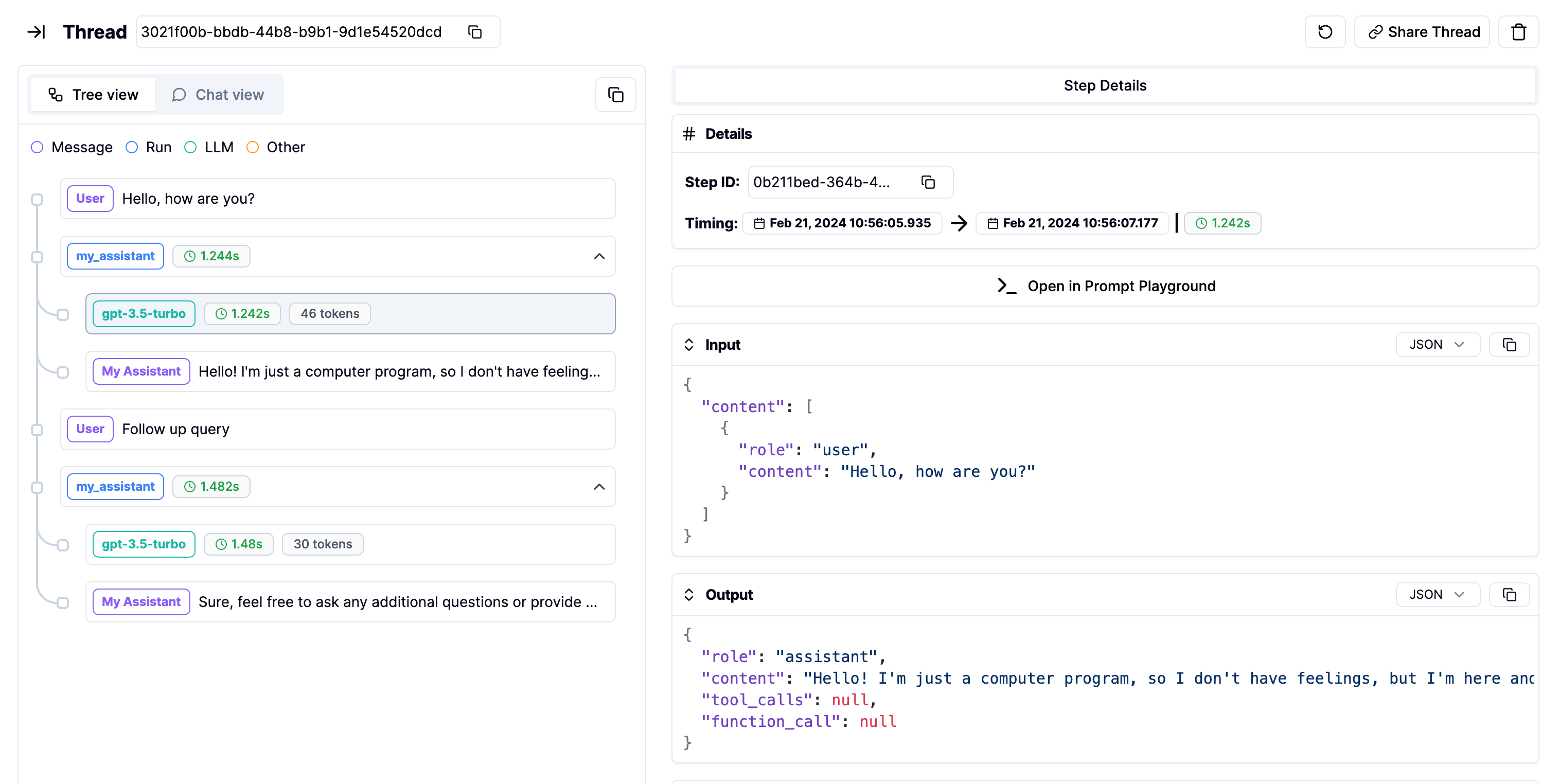
You can use [Threads](/concepts/thread) and [Steps](/concepts/step) on top of the OpenAI API to create structured and organized logs.
```python Python
import os
from literalai import LiteralClient
from openai import OpenAI
openai_client = OpenAI()
literal_client = LiteralClient(api_key=os.getenv("LITERAL_API_KEY"))
literal_client.instrument_openai()
@literal_client.step(type="run")
def my_assistant(user_query: str):
completion = openai_client.chat.completions.create(
model="gpt-3.5-turbo",
messages=[
{
"role": "user",
"content": user_query,
}
],
)
literal_client.message(content=completion.choices[0].message.content, type="assistant_message", name="My Assistant")
def main():
with literal_client.thread(name="Example") as thread:
initial_user_query = "Hello, how are you?"
literal_client.message(content=initial_user_query, type="user_message", name="User")
my_assistant(initial_user_query)
follow_up_query = "Follow up query"
literal_client.message(content=follow_up_query, type="user_message", name="User")
my_assistant(follow_up_query)
main()
# Network requests by the SDK are performed asynchronously.
# Invoke flush_and_stop() to guarantee the completion of all requests prior to the process termination.
# WARNING: If you run a continuous server, you should not use this method.
literal_client.flush_and_stop()
```
```typescript TypeScript
import { LiteralClient, Thread } from '@literalai/client';
import OpenAI from 'openai';
const client = new LiteralClient(process.env['LITERAL_API_KEY']); // This is the default and can be omitted
const openai = new OpenAI({
apiKey: process.env['OPENAI_API_KEY'] // This is the default and can be omitted
});
async function myAssistant(thread: Thread, initialUserQuery: string) {
const run = thread.step({
name: "My Assistant",
type: "run",
input: { content: initialUserQuery },
});
const completion = await openai.chat.completions.create({
model: "gpt-4",
messages: [{ role: "user", content: initialUserQuery }],
});
await client.instrumentation.openai(completion, run);
run.output = completion.choices[0].message;
await run.send();
await run
.step({
output: completion.choices[0].message,
type: "assistant_message",
name: "My Assistant",
})
.send();
}
async function main() {
const thread = await client.thread({ name: "Example" }).upsert();
const initialUserQuery = "Hello, how are you?";
await thread
.step({
output: { content: initialUserQuery },
type: "user_message",
name: "User",
})
.send();
await myAssistant(thread, initialUserQuery);
const followUpQuery = "Follow up query";
await thread
.step({
output: { content: followUpQuery },
type: "user_message",
name: "User",
})
.send();
await myAssistant(thread, followUpQuery);
}
main()
.then(() => process.exit(0))
.catch((error) => console.error(error));
```
Which will produce the following logs in the `Threads` page: