> ## Documentation Index
> Fetch the complete documentation index at: https://chainlit-5-wd-prompt.mintlify.site/llms.txt
> Use this file to discover all available pages before exploring further.
# RAG Example
Let's say we have a simple LLM application that takes a user input, performs a retrieval step and generates the final response with an LLM.
The code for this application would look like this:
```python Python
import asyncio
async def semantic_search(question: str):
# Fake semantic search
await asyncio.sleep(1)
# Return fake results
return ["chunk 1", "chunk 2", "chunk 3"]
async def generate_response(question: str, search_results: list):
# Fake response generation
await asyncio.sleep(2)
return "Fake answer"
async def main():
question = input("What is your question?")
search_results = await semantic_search(question)
answer = await generate_response(question, search_results)
print(answer)
if __name__ == "__main__":
asyncio.run(main())
```
## Logging the conversation with Literal
First, we initialize the Literal client.
```python Python
import os
from literalai import LiteralClient
client = LiteralClient(api_key=os.getenv("LITERAL_API_KEY"))
```
### Logging the steps
In this example we have 2 steps: `semantic_search` and `generate_response`. We can use the `step` decorator to log these steps.
```python Python
@client.step(type="retrieval")
async def semantic_search(question: str):
...
@client.step(type="llm")
async def generate_response(question: str, search_results: list):
...
```
### Logging the run
```python Python
@client.step(type="run")
async def run_rag(question: str):
results = await semantic_search(question)
answer = await generate_response(question, results)
return answer
```
### Logging the thread
A [thread](/concepts/thread) is a sequence of steps that are related to each other. In our example, we have a single thread.
To create a thread, we use the `thread` decorator.
```python Python
@client.thread
async def main():
...
```
### Logging the user question and final answer
Finally, we can log the user question and the final answer using `client.message`.
```python Python
@client.thread
async def main():
question = input("What is your question?")
client.message(content=question, type="user_message", name="User")
answer = await run_rag(question)
client.message(content=answer, type="assistant_message", name="Assistant")
print(answer)
```
### Full code
```python Python
import asyncio
import os
from literalai import LiteralClient
client = LiteralClient(api_key=os.getenv("LITERAL_API_KEY"))
@client.step(type="retrieval")
async def semantic_search(question: str):
await asyncio.sleep(1)
return ["chunk 1", "chunk 2", "chunk 3"]
@client.step(type="llm")
async def generate_response(question: str, search_results: list):
await asyncio.sleep(2)
return "Fake answer"
@client.step(type="run")
async def run_rag(question: str):
results = await semantic_search(question)
answer = await generate_response(question, results)
return answer
@client.thread
async def main():
question = input("What is your question?")
client.message(content=question, type="user_message", name="User")
answer = await run_rag(question)
client.message(content=answer, type="assistant_message", name="Assistant")
print(answer)
if __name__ == "__main__":
asyncio.run(main())
# Network requests by the SDK are performed asynchronously.
# Invoke flush_and_stop() to guarantee the completion of all requests prior to the process termination.
# WARNING: If you run a continuous server, you should not use this method.
client.flush_and_stop()
```
## Running the example in Python
To run the example, you need to install the Literal client:
```bash
pip install literalai
```
Then, you can run the example:
```bash
python example.py
```
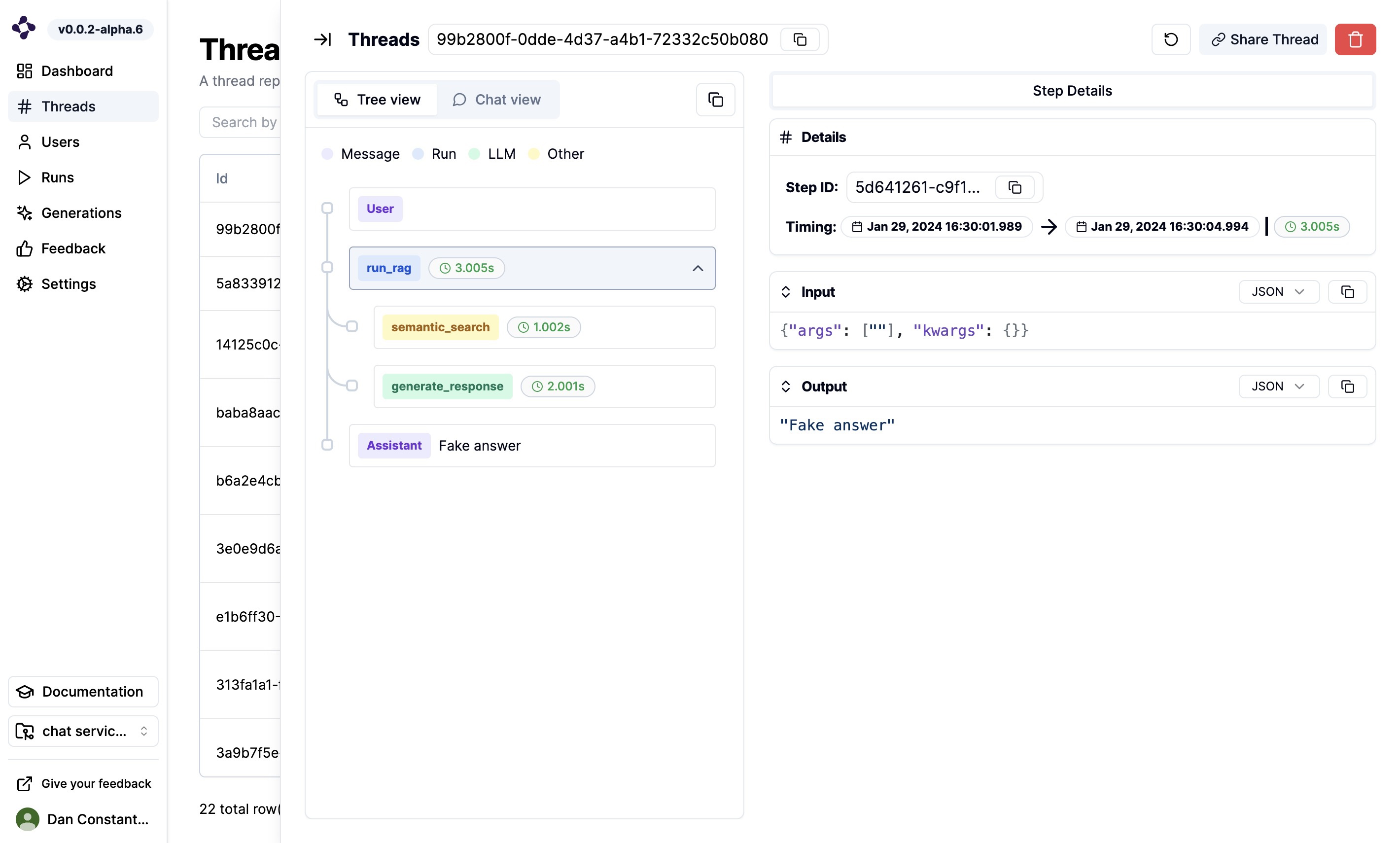
On the Literal platform, you will see the following thread being logged: